


I’m excited to welcome a new guest essay by Steven Denney, a political scientist at Leiden University who writes Pixels and Patterns. It continues our more practical series on professional writing with AI tools. Although this one might seem a little nerdy, I promise the payoff is worth your time. Instead of worrying that AI will make things up, Steven explains how you can use it as a superhuman fact-checker on your side to boost your human writing. It’s especially useful for anyone who already uploads sources to AI and wonders why they would need anything more.
Imagine you are doing some research, and you need to write something based on it. This could be a paper, a concept note, a literature review or something similar. In the process, you have been downloading papers and collecting them in a folder – or maybe they’re just sitting in the downloads. The naming of the papers is a bit all over the place. Some of them have readable names, others have really long strings of numbers that you got from whatever website you downloaded them from, and some are just called something like “Download (3).pdf”. Or maybe you’re a stickler for the FAIR data principles and are very organized and have been downloading and filing the papers as you go.
However you organize them, if you’ve uploaded a few sources to ChatGPT or Claude, you know it helps in the moment. But you can’t be sure what it has read, and next week you start over. The fix is to keep a text copy of each source that the AI can search, in the same folder as your draft and notes. Then every session starts from the same sources, and the AI can do more than summarize them. It can check your writing against them, telling you whether a reference is real and whether a source says what you claim, and quoting the passage so you can judge for yourself. Below, I explain how I set this up and how you can try it.
Back to that folder of papers. At some point, out of curiosity, you drag a few of the papers into your AI tool of choice and start to ask questions about them. You spend a good amount of time interacting with it, discussing the papers regarding what they say, how they relate to what you are working on, how they compare to each other, and where certain claims show up in them. (I trust you’ve read the papers yourself, but it can be helpful to have the AI “read” them as well.)
When you come back to the piece, whether you start a new conversation or go back to the same one, you are going to have a hard time picking up where you left off. You’d have to figure out what you actually did last time, which papers were relevant, what you concluded about them, and so on. The problem is not really that you have to upload the PDF again. It’s that this way of working with sources in a conversation doesn’t help you stay organized as you read, bring in new sources, and check your claims. The last of these matters most and it’s not (just) because people are offloading the work of checking source claims to AI. Citing a source for something it doesn’t actually say is a problem pre-dating AI. A 2015 meta-analysis of 28 studies of medical journal articles found that about one in four citations had errors in how they used the cited source, minor ones included, and about one in eight had a major error. Perhaps AI is exacerbating this problem, but the problem is not new.
Some tools can help out a bit here. A Project in Claude keeps documents available across related conversations. Zotero lets you collect and organize your sources, take notes, and keep PDFs and bibliographic information together. I’m not arguing against either, to be sure. But neither quite works the way that is optimal for AI-integrated workflows. As Alexander wrote in August, uploading your papers to a project folder “changes what the chatbot knows; an agent changes what AI can practically do with the files you share.” So I came up with a way of organizing my sources inside a research project (where you also have the manuscript, notes and decisions) that an AI agent can inspect as well. I call this a “research knowledge base,” borrowing the terminology from the AI researcher Andrej Karpathy, whose own version, an “LLM wiki,” I come to below. It contains:
The original sources, renamed but otherwise untouched.
A plain-text copy of each source, which the AI can search.
A bibliography, with one entry for each source.
Instructions on how to work with the knowledge base, including a number of AI “skills.”
Figure 1 shows how these pieces fit together in a project folder, and how a citation in your draft leads back to its source.
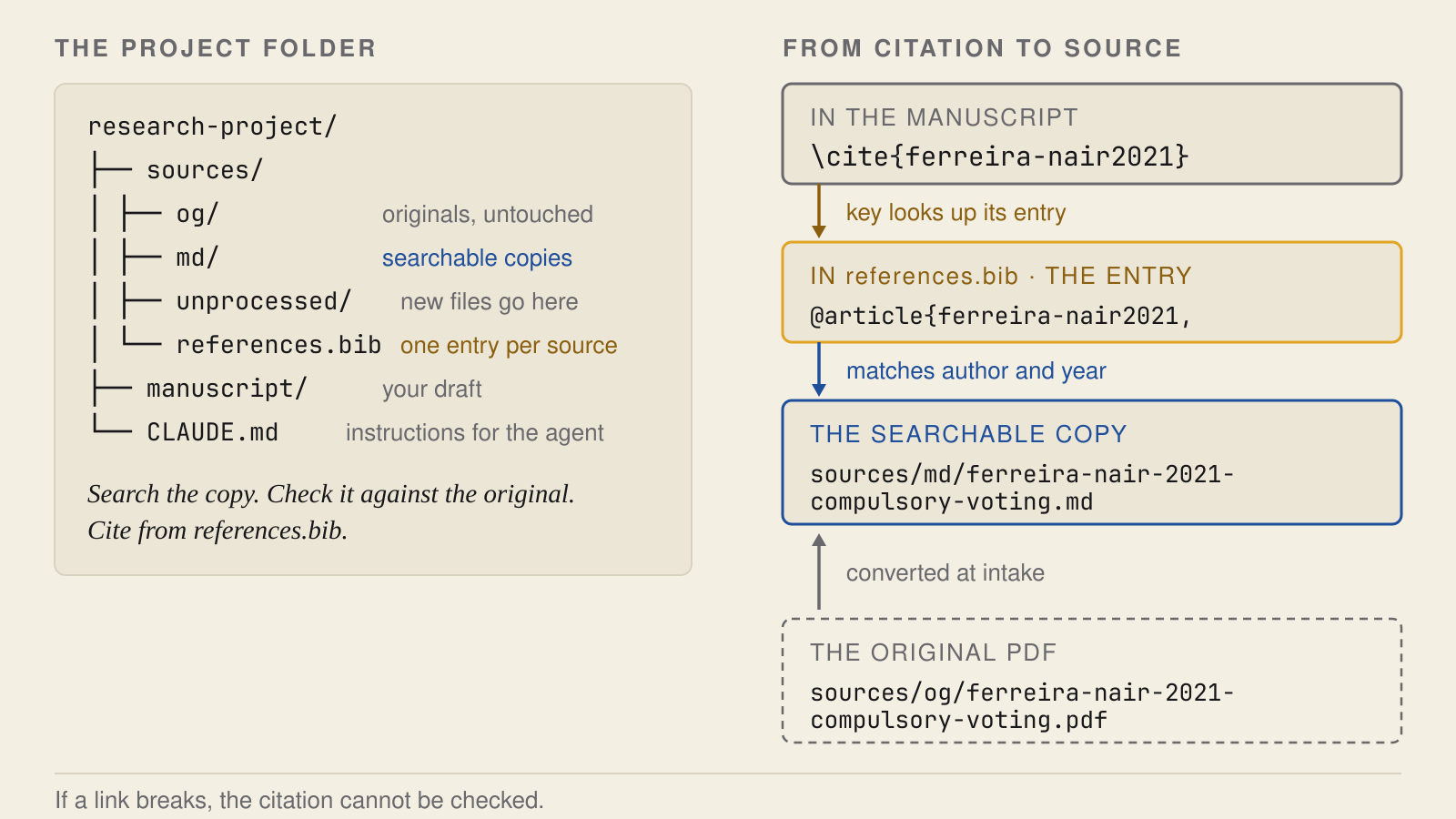
Figure 1. The knowledge base inside a project folder
On the left, the project folder keeps the original PDFs, their searchable copies and the bibliography together. On the right, a citation key in your draft leads to its bibliography entry, then to the searchable copy and the original PDF. The example files are invented.
Where I part ways with Karpathy
Karpathy, whose insight into AI best practices and how new technology and education will interact is some of the best out there, recently wrote about a similar setup he has built, which he calls an LLM wiki. It uses AI to write summaries and other notes on top of a set of documents and to keep them up to date. He frames the problem much as I do above. Without the wiki, in his words, “the LLM is rediscovering knowledge from scratch on every question. There’s no accumulation.” I describe his setup in more detail below.
In Karpathy’s setup, the original documents are kept as the source of truth, and the LLM cannot change them. But questions are answered from the wiki, and it’s the wiki that grows. For my purposes, it seems better to work directly from the sources, with the AI taking me to them, rather than only reading AI-produced summaries and the connections between them. Summaries will always leave things out and run the risk, although smaller than it used to be, of hallucination.
So, I will expand on Karpathy’s idea a bit, to explain how I work with my sources. Next to each original source, I keep a plain-text copy (which LLMs can inspect and search) that is linked to bibliographic information about the source. Notes and connections can be made within the collection, but they stay separate from the source texts. As the copies can be “messy” (we will see why), I don’t recommend treating them as the only source of truth about a source. They are working copies.1
Building your knowledge base
To follow along with the instructions I’ll provide below, I strongly advise using Claude Code, an AI agent that can work with files and run other tools on your computer. I advise also installing a set of additional instructions that I have created, which I call Open Science Skills.2 These “skills” are instructions that can be used by an agent to perform certain tasks like setting up a research project, work with a source, check citations in a manuscript, review a manuscript, and so on. Some of them also have scripts or other files that help the agent perform the task. You don’t need to know computer programming to use them. They also need some other tools in order to work. You can read about how to set them up in the getting-started guide.
Setting everything up takes about half an hour, and you only have to do it once. You need a paid Claude plan (Pro or above), or, if you use OpenAI’s Codex instead of Claude Code, a ChatGPT plan that includes it. Then you install the agent, the skills and the PDF converter, which requires Java. The guide is written for someone who has never used the command line before, but recommends that they go this route. If you run into problems installing the skills or the converter, you can ask the agent to help you fix them – and even just “talk to your terminal.” Once it’s set up, it takes the agent a minute or two to add a new paper, and a few minutes for you to check that it named the file correctly and to look through the conversion. Even if you have never worked with agents before, it’s really quite simple. Checking the agent’s work takes some care, and the knowledge-base walk-through on the AI for Research site lets you try that on made-up sources first.
All my skills start with oss:, short for Open Science Skills. You run each skill by typing its name in Claude Code. For this post, you only need a few of them, plus one command the first one adds to your project:
/oss:research-repo sets up a project folder for your sources.
/process-source adds a new paper to it.
/oss:citation-check checks that your references exist and match the publisher’s record.
/oss:fact-check checks whether your sources say what you claim.
Then, here’s how the process works. I open Claude Code in a folder where I want to set up the project (it can be an empty folder) and type /oss:research-repo. The agent turns the folder into a repository, which is just a fancy word for a project folder that also keeps track of changes to the files in it. If there are any issues, you’ll be notified and asked how you want to deal with them. (I’ll say a little more about that below.)
Now, let’s say I have a paper that I want to add to the project. I drag it into a folder for incoming sources (sources/unprocessed/). The skill will tell you where this folder is if you need guidance. Say the paper is called “Download (3).pdf”. I then type /process-source and the agent will start to process the source. (This command has no oss: prefix because /oss:research-repo added it to your project. You can also just say “process sources” and the agentic system will know what to do.) It will first try to figure out the title, authors and year of the source. Check these, because every later step uses the name it gives the file. Then, it will move the source to a folder for sources, and rename it to something like ferreira-nair-2021-compulsory-voting.pdf. It will not change the content of the source.
Next, it will convert the source to a Markdown file, which is a plain text file that can be read by an LLM. The conversion is done by OpenDataLoader PDF, the open-source converter the skill currently uses. Finally, it will create an entry in a bibliography file, where it will store bibliographic information about the source. The entry will have a citation key, which is a short identifier for the source. In this case, the citation key is ‘ferreira-nair2021.’ The key links a citation in your manuscript to its entry in the bibliography. Because the key and the file name share the authors and year, the agent can also find the files for the source itself, as the right side of Figure 1 shows. This naming convention is also saved in an instruction file, CLAUDE.md, which the agent reads in future sessions to understand how the sources are organized. Figure 2 shows the whole sequence.
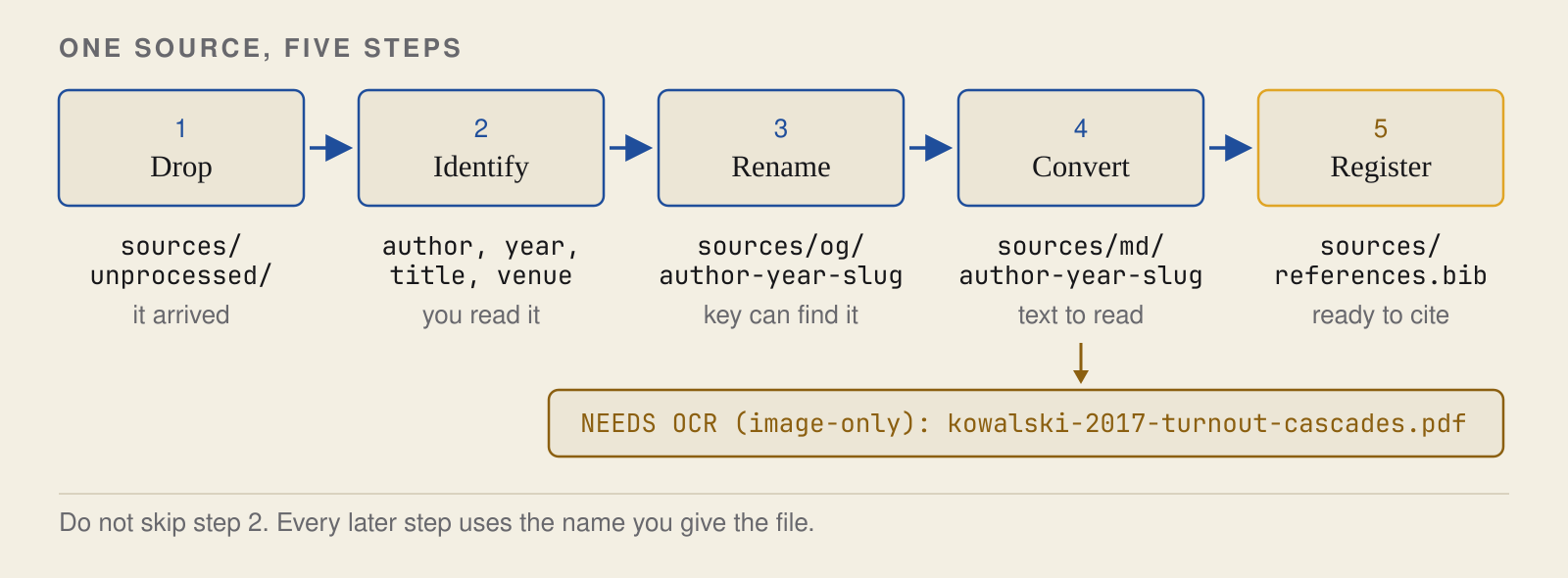
Figure 2. Adding a paper in five steps
You drop the paper in, and the agent does the rest. You can check its work at steps 2 and 4, where it reads the paper’s details and where the converter makes the searchable copy.
Converting a PDF to text is not always clean, so check the text copy against the original PDF. Two problems come up often. One type of problem is when the PDF is a scan, and there is no text layer in the PDF. In this case, the conversion will not work, and you will need to use a tool to perform OCR (optical character recognition) on the PDF first. The skill will recognize when this is the case, and will file the source but mark it as not yet converted, as with the scan in Figure 2. For a paper or two, you can just ask Claude Code (or Codex) to read the scanned pages and write them out as Markdown, which your subscription easily covers.3 But you should still check the OCR’d text against the original.
Another type of problem is when the PDF contains tables. The conversion may not be perfect, and the table may not be converted correctly. For example, in a small results table from the walk-through, all the numbers came through, but the column headings were merged into the section title, and the two rows ran together on a single line. So, the information is there, but it’s not very readable. In this case, the conversion log didn’t flag any problems, which is why you should check the conversion yourself.
Sometimes you’ll encounter a source that you don’t have, either because you couldn’t find it, don’t have access to it digitally (e.g., a book), or because you couldn’t convert it. In these cases, you should still keep it in your knowledge base in the form of a summary Markdown file, kept apart from the text copies and marked as not having been checked yet. That way, you can still track it in your knowledge base and can come back to it later if you need to. This kind of approach is a bit closer to Karpathy’s LLM wiki idea. And it’s better than having nothing. But for researchers who need to check things against full sources, it’s, of course, not ideal. This will likely require something old school – getting a physical copy of, say, a book and checking it yourself.
Keeping a record of your work
Having a knowledge base is one thing, but you also need a record of the work on the project itself. This includes your research question or writing goals, notes about the sources you’ve read and how they relate to your project, decisions you’ve made, and things you still need to do. This type of information should be kept separate from the sources, because it is your interpretation and plans, not part of the sources themselves.
One way to do this is to save notes from your conversations with the agent. For example, if you’ve had a conversation with the agent about a certain comparison between sources or some ideas about how to synthesize arguments, you can save that comparison as a note. Or, if you’ve made a decision about the project, you can write that decision down, along with the reason for it. I generally recommend that you ask the agent to update two types of notes at the end of a session:
A handoff note, which is a note about where you are in the project and what you need to do next.
A session log, which is a log of what you’ve done in the session. This log should not be updated, only added to.
I have a skill for that, /oss:finished, which you use to close a session. The skill tells the agent to keep the two apart, and also to keep work that’s been done (and verified) apart from work that’s only been tried or talked about. But always make sure the work has actually been done. It’s very easy for an agent to say work is done when it isn’t, and to update earlier entries in the log when it shouldn’t. So check that the log is correct before you save it.
Another way to keep track of your work is to use a version control system like Git, the tool behind GitHub. This will allow you to make “checkpoints” in your work, so you can see what has changed since the previous checkpoint and go back to previous versions if needed. These checkpoints are called “commits.” Also, if you upload your project to GitHub, make sure to set the project to private. Although the papers have been converted to text, they are still subject to the same copyright as the original papers.4
Now that you’ve saved your notes, the next time you start a session, all you’ll need to do is have the agent read the project instructions and the last handoff note (/oss:sitrep, the partner of /oss:finished, does this), and open any sources it needs. You still have to interpret what it tells you, but you won’t have to rebuild the project.
Checking your references and claims
You can run two kinds of checks. One is to have the AI agent check that the references you have listed actually exist and that the details in your reference list match those held by the publisher (including the DOI). Use the /oss:citation-check skill for this. This may become more important as more people use AI, since AI can make up references. The agent will flag any it cannot confirm or with which it has concerns, for you to look at.
The other, more important check is whether the sources you cite actually say what you claim. Use the /oss:fact-check skill for this. The agent can do this because it has the knowledge base, with text copies of the sources you cite. If it finds the part of a source you are basing a statement on, it will quote it to you and say whether or not it backs up the sentence you have written. You can then check the quote against the original yourself. Only you can decide if the source itself is correct.
Here’s an example from a paper of mine on public support for immigration policy, which asks whether the way a policy is made affects support for it. To answer that question, I drew on research on presidential power in the United States, an area outside my immediate area of expertise. I wrote the following sentence in a draft:
“Studies of unilateral policymaking similarly show that citizens penalize executive action relative to legislative action (Reeves & Rogowski 2016; Christenson & Kriner 2017).”
In other words, I was claiming that the two studies I cited showed that people react less favorably to a policy adopted through executive action than to one adopted through legislation.
I was a bit wrong there. The agent found the relevant passages in both studies (Figure 3). Reeves and Rogowski did not compare support for executive and legislative policymaking. They found generalized support for unilateral powers to be very low, with only about a quarter of respondents supporting them. Christenson and Kriner did compare the two, in experiments in which respondents read about the same policy but were told either that it came from executive action or from legislation, and there was no statistically significant difference in support. Support depended mostly on respondents’ partisanship and whether they agreed with the policy. So neither paper supports the claim that citizens penalize executive action, and the agent suggested narrowing the sentence to what each paper actually found. That part of the paper now reads:5
“Studies of unilateral policymaking find that Americans express low generalized support for unilateral powers (Reeves & Rogowski 2016) while judging particular unilateral acts largely by whether they agree with them (Christenson & Kriner 2017).”6
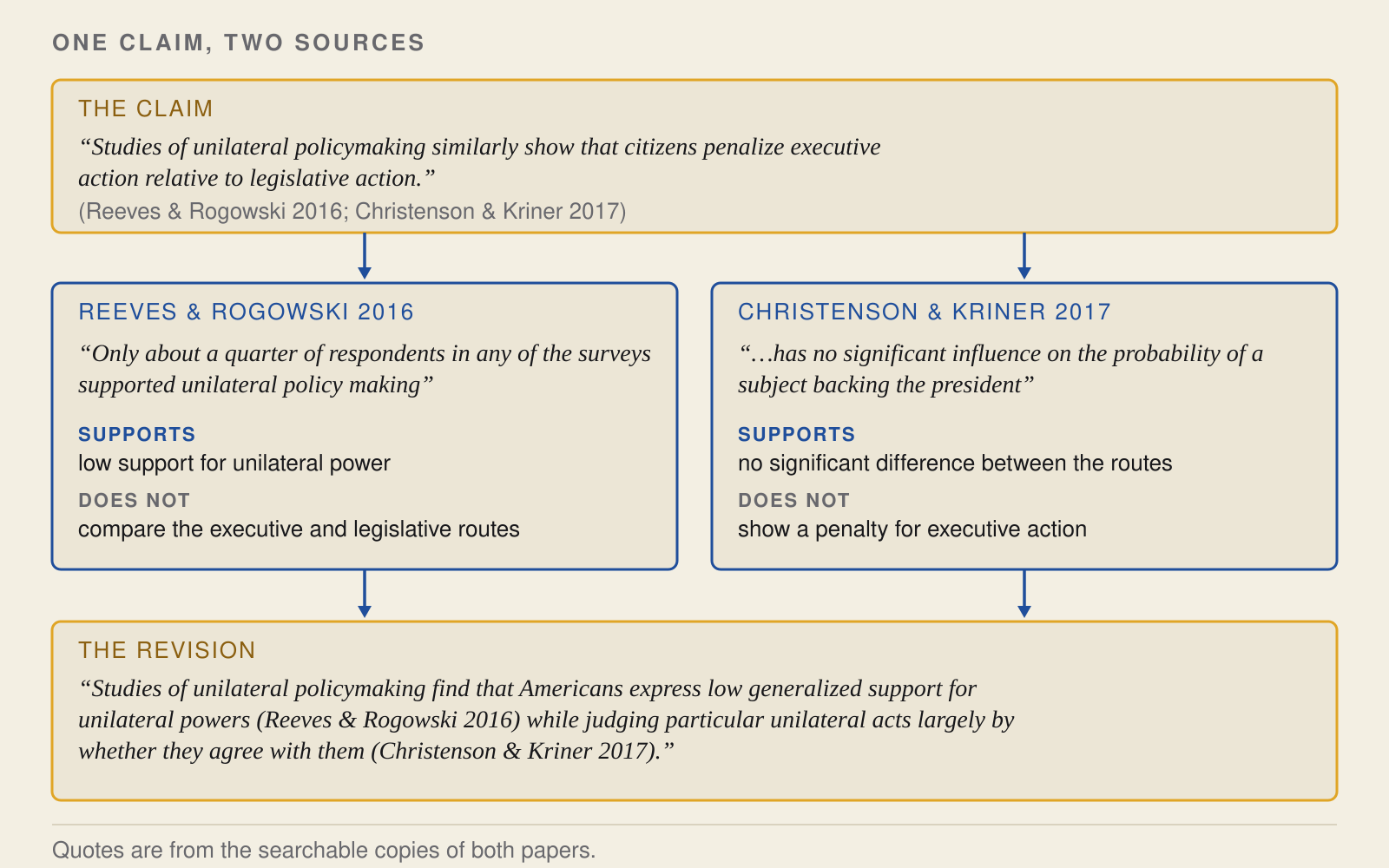
Figure 3. Checking a claim against its sources
For each paper, the agent quoted the relevant passage and said what it supports and what it does not. The bottom box is the corrected sentence that replaced my original claim.
The original claim does have support elsewhere. In a later paper, Reeves and Rogowski do show that people react more negatively to policies adopted through unilateral action than to policies adopted through legislation. I had cited the wrong paper, and looking at my reference list would not have caught that, because the reference itself was correct. Across the whole paper, the same check led to seventeen corrections to how I cited sources.
It’s a good idea to save these checks, including the date and the model used, so that you can run the check again later on the same text, perhaps with a newer model.
Try it yourself
If you are new to AI agents, start with the getting-started page on the AI for Research site. It shows you how to install Claude Code and the Open Science Skills.7 When you are set up, try the knowledge-base walk-through on the same site. It uses some made-up sources, including a scan that needs OCR and a table whose structure breaks on conversion.
Once you have gone through it, try setting up a knowledge base for one of your own research projects, and add a single paper that you want to use in it. At the end of the session, have the agent write a handoff note on what you have done and what you need to do next. Then open a new session, and ask the agent to find the passage in that paper that bears on a claim you have made in a draft, and whether it supports, qualifies or contradicts the claim.
Doing research and writing in 2026 means checking your claims with the best tools available and saying how you did it. In a short note posted in early October, the Yale political scientist Peter Aronow argues that, at least in quantitative research, a paper without a statement on whether the authors used LLMs is now cause for suspicion. If they used one and did not say so, they misrepresented how the research was done. If they did not use one, they “declined an inexpensive and effective check of their results without acknowledgment or justification.” I’d extend that to anyone who writes professionally and cites sources. In 2026, refusing to let AI check your claims against your sources, when the check is this cheap, is arguably a form of bad research practice.
P.S. Other ways to build a knowledge base
Karpathy uses his LLM wiki for personal knowledge bases on topics he is researching. The idea is to build a wiki on top of your original source documents. The wiki holds notes about those documents, such as summaries, comparisons, concepts and syntheses, in a format the machine can easily read (ideally Markdown). There is also a file of instructions, which the LLM reads, on how the wiki should be maintained. When you add a new source document, the LLM reads it and adds or updates notes in the wiki as needed. He writes that the idea is related in spirit to Vannevar Bush’s Memex of 1945, in which readers could build trails between documents. Using AI to maintain those trails is what is new, and for project-based researchers, it is the exciting part.
One feature of Karpathy’s approach that I like is that you can look at it. He reads his wiki in Obsidian, a note-taking app whose graph view, he writes, is “the best way to see the shape of your wiki.” He also has the AI answer with slides and charts. In May, he suggested asking for answers as web pages, with the prompt “structure your response as HTML,” and then opening the file in a browser. Christopher Kenny’s workshop demo for political scientists is likewise a set of linked notes meant to be opened in Obsidian. It would not be hard to do any of this on top of a research knowledge base, and it may be worth exploring. But a graph or a web page is another kind of summary. To check a claim, you still go back to the text copy, and from there to the original.
I am not the only one who goes back to the sources. The journalist Casey Newton built a wiki like this for his newsletter, with more than 1,440 pages. He describes using it to refresh his memory before writing, “while also opening up the original sources to make sure nothing I was about to say was hallucinated.”
In the latest development in knowledge base developments, Soyeong Jeong and colleagues at KAIST and Microsoft recently posted a preprint “Follow the Entities: A Corpus Map for Agentic Search,” on how to arrange a large collection of documents so that an AI agent can find its way around it. They arrange it as a map, with one page for each entity, such as a person or a product, that comes up in two or more documents. Each page links to every document that mentions it, and each fact is tagged with the document it came from. Tested on thousands of workplace documents, the map improved the agent’s answers and cut its costs. An AI-written wiki modeled on Karpathy’s did worse than plain search with three of the four models they tried. The map is like a research knowledge base in that it points back to the sources instead of replacing them. The problem is that it points you to entire documents, so you still have to open them and find the passage that bears on your claim. It is also geared toward much larger collections of documents than any individual project or paper would be. It’s worth exploring but I don’t find it well matched to a researcher’s way of using these kinds of systems.
For something as small as a few hundred papers, it makes sense for the agent to just search the whole thing every time. If I were to add something new drawing from more recent work and ideas, it would be a simple index of the people, parties, datasets and cases mentioned in my sources, and the files they appear in. I am tinkering with that approach at present.
Christopher T. Kenny shows a related setup for political scientists in “Agentic AI for Political Science Research,” a skills workshop at Princeton’s Center for the Study of Democratic Politics, 10 September 2026 (slides: https://christophertkenny.com/files/2026-09-10-csdp-ai.pdf; code: https://github.com/christopherkenny/csdp-llm-wiki). There is a subtle but important difference between his version and mine. In his version the wiki is built and all the text conversions are treated as something that can be regenerated and are part of a staging process. With my approach, the text conversions are part of the collection. The reason this is important is if the text is extracted on the fly and never stored anywhere, there is no way to tell if what the agent “read” is correct. By storing the version, it can be compared with the PDF and fixed if need be.
The toolkit also has a version for OpenAI's Codex (https://developers.openai.com/codex). This walkthrough uses Claude Code.
For a large set of scans, such as older printed materials, the Open Science Skills include /oss:vlm-ocr, which helps you choose an OCR model and run it across the whole collection. Otherwise, ask the agent to suggest an approach for your documents.
The /oss:research-repo step already set up Git for you in your project folder. But Git won’t make checkpoints on its own, so remember to tell the agent to make a checkpoint at the end of each session. The PDFs will not be saved in Git, so you’ll need to back those up some other way. You can also familiarize yourself with .gitignore so that you don’t accidentally share information you’re not supposed to.
To be clear, I revised the sentence myself back in August. I ran the check on the archived version when I was preparing a lecture in September, to see what it would do. It caught the same problem I had, and the narrower claims it suggested are essentially the changes I had made. Of course, the ease with which one could automate here is obvious. Writers will need to make their own decisions here, taking into account what is expected of them, what they have declared that they are doing, and what they are willing to allow AI to do. If you find a source claim problem, AI can very easily rewrite it for you. For the sake of keeping yourself in the loop and learning about the sources that you are presenting yourself as knowing, I urge you to wrestle with the prose yourself, generate the claims you need, and implement and check them. Nothing wrong with getting some help from the friendly robot, though.
Andrew Reeves and Jon C. Rogowski, "Unilateral Powers, Public Opinion, and the Presidency," Journal of Politics 78, no. 1 (2016), https://doi.org/10.1086/683433; Dino P. Christenson and Douglas L. Kriner, "Constitutional Qualms or Politics as Usual? The Factors Shaping Public Support for Unilateral Action," American Journal of Political Science 61, no. 2 (2017), https://doi.org/10.1111/ajps.12262. The quoted text is one clause of a longer sentence in the manuscript.
If you use ChatGPT, it also covers OpenAI's Codex. You can check out Anthropic's Claude Code quickstart or OpenAI's Codex quickstart, but both are geared towards programmers, so use them alongside my guide.
